
Outlook Schedule Sending Automatic Email5.2 - Download
You'll be able to download in few seconds.
Publisher Description
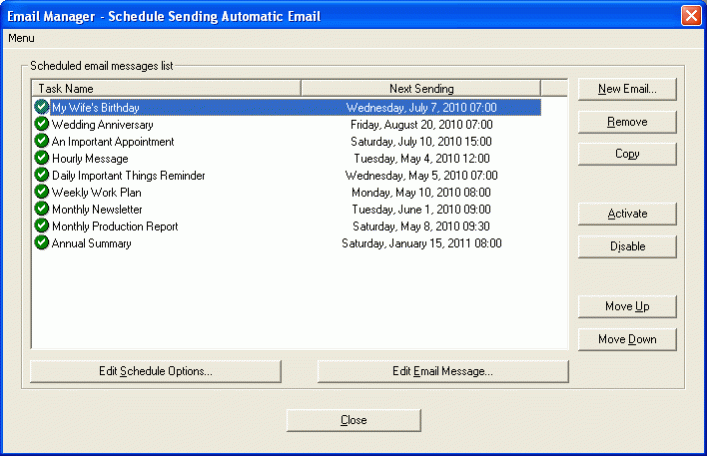
Schedule Sending Automatic Email is a powerful and easy-to-use Outlook Email Scheduler for automatically sending the recurring email message on schedule using Microsoft Office Outlook. The software can be used to send automatic email on schedule (minutely, hourly, daily, weekly, monthly, yearly or a specified future date). The software can be used to send an email message with the different attachments every time, even includes an entire folder. You can select an expiration date or expiration number of sending, if the system date later than the expiration date, or the number of the email has been sent is equal to the expiration number, the recurrences will be stopped.
You can create, change, remove, copy, activate or disable the email message and schedule options anytime.
Microsoft Office Outlook 2016, 2013, 2010, 2007, 2003, 32 bit and 64 bit supported.
No recurrences - Only send the email one-time on the starting date without any recurrences.
Minutely - Send the email every N minutes. If the N is a multiple of 60, it's hourly.
Daily - Send the email every N days. Or, send the email every day, weekday, weekend day, even day or odd day.
Weekly - Send the email on some days of a week (optional) every N weeks. Or, send the email on some days of the first ( second, third, fourth or last ) week of every month.
Monthly - Send the email on the specified date of every N months. Or, send the email on the first ( second, third, fourth or last ) day ( weekday, weekend day, even day, odd day, Sunday, Monday, Tuesday, Wednesday, Thursday, Friday or Saturday ).
Yearly - Send the email on the specified date annually, for example, January 1 or December 25 every year. Or send the email on the first ( second, third, fourth or last ) day ( weekday, weekend day, even day, odd day, Sunday, Monday, Tuesday, Wednesday, Thursday, Friday or Saturday ) of January ( February, March, April, May, June, July, August, September, October, November or December ).
About Outlook Schedule Sending Automatic Email
This Office Suites & Tools program is available in English. It was last updated on 29 October, 2026. Outlook Schedule Sending Automatic Email is compatible with the following operating systems: Windows.
The company that develops Outlook Schedule Sending Automatic Email is ACCM Software. The latest version released by its developer is 5.2.
The download we have available for Outlook Schedule Sending Automatic Email has a file size of 3.1 MB. Just click the green Download button above to start the downloading process. The program is listed on our website since 2016-01-19 and was downloaded 0 times. We have already checked if the download link is safe, however for your own protection we recommend that you scan the downloaded software with your antivirus. Your antivirus may detect the Outlook Schedule Sending Automatic Email as malware if the download link is broken.
How to install Outlook Schedule Sending Automatic Email on your Windows device:
- Click on the Download button on our website. This will start the download from the website of the developer.
- Once the Outlook Schedule Sending Automatic Email is downloaded click on it to start the setup process (assuming you are on a desktop computer).
- When the installation is finished you should be able to see and run the program.
Program Details
System requirements
Download information
Pricing
Version History
version 5.2
posted on 2016-01-19
New Release
Disclaimer
External Download
We do not host Outlook Schedule Sending Automatic Email on our servers. We did not scan it for viruses, adware, spyware or other type of malware. This app is hosted by the software publisher and passed their terms and conditions to be listed there. We recommend caution when installing it.
The external download link for Outlook Schedule Sending Automatic Email is provided to you by apps112.com without any warranties, representations or guarantees of any kind, so access it at your own risk.
If you have questions regarding this particular app contact the publisher directly. For questions about the functionalities of apps112.com contact us.
